asciimoon.com という月の満ち欠けがasciiart で表現されたサイトがあります.ただしJavaScriptが無いと満ち欠けは分からずw3m などでは今ひとつな感じでした.
ASCII Moon はそのsiteにインスパイアされた月の満ち欠けをTUI で表示するコマンドです.
ASCII Moon はReleases page にLinux/macOS/Windows のamd64 版のバイナリが置いてあります.
Linux armhf ではどうだろうと今回はsource からbuild しました.
$ git clone https://github.com/rockydd/ascii_moon.git
$ cd ascii_moon
$ cargo build --release
$ ./target/release/ascii_moon
$ ./target/release/ascii_moon --help
A TUI to show the moon phase

Usage: ascii_moon [OPTIONS]

Options:
  -d, --date <DATE>    Date in YYYY-MM-DD format (defaults to today)
      --lines <LINES>  Render the moon to a specific number of lines (non-interactive)
  -h, --help           Print help
  -V, --version        Print version
$ ./target/release/ascii_moon --version
ascii_moon 0.2.0
オプション無しでインタラクティブモード.
-d, --date <日付(YYY-MM-DD)> で特定の日付で起動.
--lines <行数> はscript やMOTD など向けで指定した行数で月のAsciiArt を出力します.
-d, --date と --lines は一緒に指定できます.
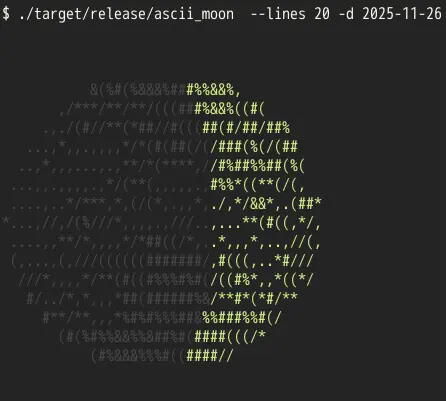
インタラクティブモードではカーソル左右で1日単位で日付を操作できます.l key で地名のラベルのon/off,L key でラベルの言語変更,i key で下部の情報のon/off ができます.
インタラクティブモードの動作の状態は以下のasciinema で確認できます.

TUI でもこのAscii Moon, astroterm, tracker など面白い天文アプリが増えている感じがします.
環境
$ ./target/release/ascii_moon --version
ascii_moon 0.2.0
$ cargo version
warning: `/home/matoken/.cargo/config` is deprecated in favor of `config.toml`
  |
  = help: if you need to support cargo 1.38 or earlier, you can symlink `config` to `config.toml`
cargo 1.92.0 (344c4567c 2025-10-21)
$ cargo build --release
$ lsb_release -dr
No LSB modules are available.
Description:    Raspbian GNU/Linux 12 (bookworm)
Release:        12
$ arch
armv7l
$ cat /sys/firmware/devicetree/base/model
Raspberry Pi 3 Model B Rev 1.2